LMC R18 camera help, XML configs and install steps for Android phones.
LMC R18
LMC R18 is Hasli's Google Camera 8.4 port for Android, with HDRnet, Leica mode, XML configs and a full height exposure slider. It brings Google Camera processing to phones that never shipped with it.
LMC R18 is a Google Camera port by Hasli that brings the Google Camera 8.4 shooting experience to Android phones that never shipped with it. It keeps the familiar Google Camera viewfinder and adds the controls that phone photographers actually reach for: extra HDR modes, a Leica style vignette mode, per lens tuning, and XML configuration files that adapt the whole pipeline to one exact phone model.
The port matters because phone cameras differ far more in software than in hardware. Two phones with similar sensors can produce very different photos, because the processing decides the sharpness, the noise handling, the colours and the dynamic range. LMC R18 exposes that processing through settings and configs, so the output can be tuned instead of accepted as it ships.
Who LMC R18 Is For
It suits people who like the Google Camera look, HDR processing with strong highlight recovery, and Night Sight style low light shots, but whose phone ships with a different camera app. It also suits tinkerers: the settings reward a few evenings of testing, and a good config can lift a mid range phone visibly. It is a poor fit for anyone who wants a camera that simply works with zero setup, since the first hour is spent finding a config and checking each lens.
What R18 Changes
R18 concentrates on the interface and on everyday usability. Hasli's changelog lists the full height exposure slider on the left side of the screen, popup lists that hold the extra mode and option buttons, vibration feedback when buttons respond, loading of custom noise and white balance models, viewfinder frame rate information, and fixed default handling for auxiliary lenses, plus a black theme and tidier top bar and sliders.
The important sentence in the changelog is the last one: there is no difference in image quality, and the changes are only for ease of use. Anyone upgrading from an earlier 8.4 release for better photos will not find them here. The upgrade is worth it for the slider, the popup buttons and the auxiliary lens handling, and configs from previous versions stay suitable, so an existing setup carries over.
Full height exposure slider on the left side of the screen, in horizontal orientation from below.
Mode and option buttons open popup lists instead of filling the bar.
Vibration response on buttons, taken from the AGC work.
Custom noise and white balance models can be loaded, with an app restart after selecting one.
Viewfinder frame rate shown from the available target frame rate ranges.
Default auxiliary lens handling fixed for many devices, so fewer manual ID changes are needed.
Main Features
HDRnet and HDR Plus Enhanced
HDRnet gives fast HDR style processing similar to HDR Plus with zero shutter lag, while HDR Plus Enhanced stacks more frames for cleaner shadows. R18 keeps both, and the choice between them is the single biggest lever on look and speed.
Leica Mode
A vignette mode that darkens the corners of the frame for a classic look. It is activated from the Leica button on the viewfinder screen and suits portraits and street shots more than landscapes.
XML Configs
One file sets the lens, patcher, noise model and white balance values for a phone model. Configs live in the LMC8.4 folder and load with a double tap on the black area around the shutter button.
Custom Noise and AWB Models
R18 loads custom noise models and white balance models, including the Julian auto white balance work. After selecting a model the app must be restarted before it appears in the interface.
Auxiliary Lenses
Ultra wide, telephoto and macro lenses can be enabled per device, with R18 improving the default handling so many phones need no manual lens ID edits.
Portrait and Night Sight
The Google Camera portrait pipeline and Night Sight low light pipeline carry over, tuned by the loaded config and the lib patcher settings for each lens.
Camera Modes Explained
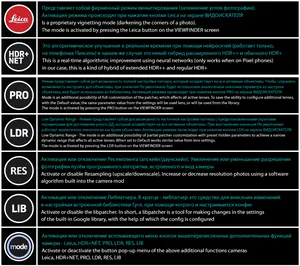
The mode buttons on the viewfinder are the quickest way to change how a photo is processed. Leica adds the vignette. HDRnet runs the fast hybrid HDR processing. PRO opens full customization of the patcher, which affects all active lenses and lets extra lenses be configured from the library. LDR narrows the dynamic range for a flatter, more controlled file. RES toggles resampling, which raises or lowers resolution through a software algorithm built into the camera mod. LIB switches the lib patcher on or off, the tool that applies the config changes to the built in library.
The mode popup button gathers Leica, HDRnet, PRO, LDR, RES and LIB into one popup menu, so the main bar stays clean. Long pressing the front camera switch changes the HDRnet and zero shutter lag frame count, and long pressing the gallery button changes the exposure time. Those two long press actions are easy to miss and worth learning early.
XML Configs and How They Work
An XML config is a saved set of settings for one phone model. It carries the lens IDs, the noise model, the white balance model, the patcher values, the frame counts for each mode and the interface choices the config author preferred. Two phones running the same LMC R18 file can shoot very differently because their configs differ, which is why config threads ask for the exact model and variant before recommending a file.
Configs for this release sit on the configs page linked from the release page. A config made for an earlier 8.4 release usually still loads, since R18 keeps compatibility with previous configs. Start with a config for the exact model, shoot the same scene with and without it, and only then judge it. A config that looks great on one sensor revision can look soft or noisy on another.
Download the config file made for the exact phone model.
Copy it into the LMC8.4 folder on internal storage, creating the folder if it is missing.
Open LMC R18 and double tap the black area around the shutter button.
Pick the config from the list and wait for the app to restart with it applied.
Shoot a test scene in daylight and at night before trusting it for anything important.
Buttons on the Viewfinder
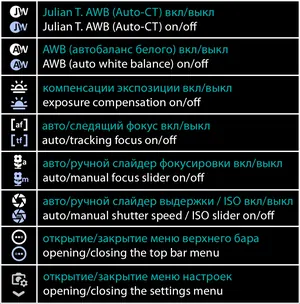
Hasli's release page documents the bar and menu buttons with diagrams, and they are worth studying before changing settings. The bar holds the Julian auto white balance toggle, the standard auto white balance toggle, exposure compensation, auto and tracking focus, the focus slider, the shutter speed and ISO slider, the top bar menu and the settings menu. The menu popup holds Leica, HDRnet, PRO, LDR, RES and LIB.
The diagrams below are the release page references, shown at phone friendly size. They explain each button in both Russian and English, which is how Hasli published them.
Bar buttons: Julian AWB, AWB, exposure compensation, focus controls, shutter and ISO sliders, and the two menus.Menu buttons: Leica, HDRnet, PRO, LDR, RES, LIB and the mode popup that gathers them.
How to Install LMC R18
Installation is a normal sideload plus a config copy. Keep the stock camera app installed, since the port never replaces it, and pick the standard package variant first. If the standard variant will not install because of a package conflict, the Snapcam, Aweme, Scan3D, Google Lens and Iris variants exist for exactly that situation, each with its own package name.
Allow installs from the browser or file manager used for the download, just for this install.
Install the LMC R18 file and open it once so it creates its folders.
Copy a config for the exact phone model into the LMC8.4 folder on internal storage.
Double tap the black area around the shutter button, pick the config, and let the app restart.
Grant camera, microphone and storage permissions when asked, and test every lens before relying on it.
If the app installs but shows a black viewfinder, the config lens IDs are the first suspect. Clear the app data, open it with no config, and reintroduce the config after the stock lenses show a picture.
Devices and Requirements
LMC R18 needs Android 10 or newer and a phone whose Camera2 API support exposes the lenses the port wants to use. The port is used across Samsung, Xiaomi, OnePlus, Realme, Vivo and Oppo phones, and the config, not the brand, decides whether auxiliary lenses, slow motion and 4K video work. Phones with limited Camera2 API support may run the main lens only, with the extra lenses greyed out or crashing.
Storage matters more than it looks: the file itself is large, and photos and video from a tuned pipeline fill storage quickly. Keep a few gigabytes free, and expect the first config tests to produce a lot of throwaway shots.
Android 10 or newer, from the app manifest minimum SDK level.
Camera2 API support on the device, ideally full level for auxiliary lenses.
A config made for the exact phone model and variant.
Free storage for the app, configs and test shots.
No root access and no unlocked bootloader needed.
Common Problems and Fixes
App crashes on launch
Clear app data and open it with no config. If it opens, the config was the cause. Load configs one at a time and avoid configs made for other models.
Black viewfinder
The lens IDs in the config do not match the phone. Remove the config, confirm the main lens shows a picture, then try a config for the exact model.
Auxiliary lens missing
Enable the lens in settings and check the lens ID values for the device. R18 improved the defaults, but some phones still need manual IDs from a device specific thread.
Slow motion or video fails
Video modes depend on the device encoder support. Drop the resolution or frame rate, and test slow motion with the stock camera first to confirm the hardware supports it.
Photos look soft or noisy
The noise model or sharpening values in the config do not suit the sensor. Try another config for the same model, and compare the same scene with HDRnet and HDR Plus Enhanced before judging.
Config will not load
Check the file sits directly in the LMC8.4 folder on internal storage, with the right extension, and double tap the black area around the shutter button rather than opening settings.
Pros and Cons
Pros
Google Camera processing on phones that never shipped with it.
XML configs tune the whole pipeline per phone model.
Fast HDRnet mode plus deeper HDR Plus Enhanced stacking.
Leica, PRO, LDR, RES and LIB modes in one popup menu.
No root needed, and the stock camera stays installed.
Cons
Setup takes time, and a wrong config causes crashes or a black viewfinder.
Auxiliary lenses and video modes vary by device and config.
The file is large, and test shooting fills storage quickly.
No single config suits every phone, even within one model line.
Safety and Verification
Every file listed here is checked against the release page details before it is described: the package name, the file size, the permissions and the minimum Android level come from the app file itself, not from a description page. The permissions the app requests are the ones a camera app needs: camera, microphone, location for photo geotags, network access, vibration and wake lock, plus storage access for photos and configs.
Install from a source you trust, compare the file size with the release listing, and keep the stock camera as a fallback. If a download asks for extra permissions at install time that a camera app has no use for, stop and check the source before continuing.
Frequently Asked Questions
What is LMC R18?
LMC R18 is a Google Camera port by Hasli, built on Google Camera 8.4. It adds extra controls and tuning options to the stock Google Camera interface, including HDRnet, Leica mode, custom noise and white balance models, and XML configuration files that tune the camera for a specific phone model.
Does LMC R18 need an XML config to work?
It opens and shoots without one, but the results depend on it. An XML config sets the lens settings, noise model, white balance model and tuning values for a particular device. Load a config made for the exact phone model, from the configs page for this release, and the camera behaves the way the config author tuned it.
Which phones can run LMC R18?
Phones on Android 10 or newer with Camera2 API support. The port is used most on Samsung, Xiaomi, OnePlus, Realme, Vivo and Oppo phones, and the right package variant and config matter more than the brand name. If the stock camera app is the only camera that works on a phone, a port may still fail on auxiliary lenses.
What changed in R18 compared with R17?
R18 is an interface and usability release. It adds the full height exposure slider on the left side of the screen, popup lists for mode and option buttons, vibration feedback on buttons, custom noise and white balance model loading, viewfinder frame rate information, and better default handling of auxiliary lenses. Hasli states there is no difference in image quality, and configs from previous versions remain suitable.
Is LMC R18 safe to install?
The file is a camera app that asks for camera, microphone, location and storage permissions, which match what a camera app does. Install it from a source you trust, keep the stock camera app installed as a fallback, and check the permissions it requests at install time. Back up photos before changing configs, since a bad config can make the viewfinder slow or crash on launch.
Why does LMC R18 crash on my phone?
The usual causes are a config made for a different model, an auxiliary lens the phone does not expose, or a noise model the device cannot load. Clear the app data, open it without a config, and load configs one at a time. If the crash happens on the front camera only, the config front lens settings are the first place to look.
Can LMC R18 be installed next to the stock camera?
Yes. The port installs as a separate app with its own package name, so the stock camera stays untouched. Some variants use package names that match other apps, so pick the standard variant first and only switch variants if the standard one refuses to install.
Does LMC R18 work without root?
Yes. It needs no root access and no unlocked bootloader. It is a normal app install, plus an optional XML config file copied into the LMC8.4 folder on internal storage.
Conclusion
LMC R18 is the usability release of Hasli's 8.4 line: the same image quality as the releases before it, with a better slider, tidier buttons, custom noise and white balance models, and auxiliary lenses that need less manual fixing. Its value lives in the config. Find one made for the exact phone, test it against the stock camera on the same scenes, and keep the setup that wins. For phones with a matching config, it remains one of the most rewarding camera ports to run.